How We Build Legacy System Integration for Hermosa
Every legacy integration starts with an honest technical assessment of what the legacy system can actually do. Some older systems have hidden integration capabilities that were never configured. Others have well-documented export functions that nobody has used. Some have nothing useful at the API level but produce reliable file exports that an integration layer can process. The assessment determines the integration strategy.
We then map the data flows the business needs: what information needs to move from the legacy system to which modern systems, at what frequency, and in what format. For a Fullerton Avenue taqueria with a legacy POS, the data flow might be daily sales totals moving to the accounting platform and transaction-level data moving to the analytics dashboard. For a salon on Armitage Avenue with legacy scheduling software, the flow might be appointment data moving to a modern CRM.
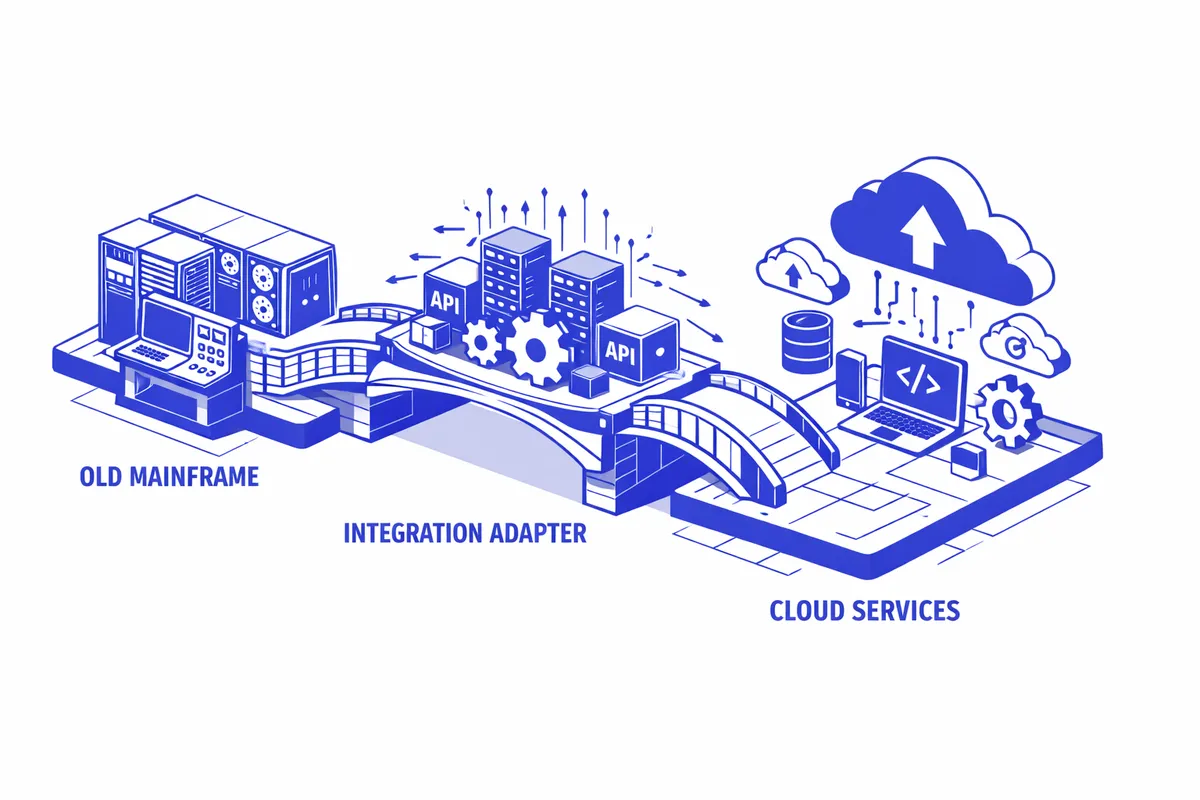
The integration layer we build sits between the legacy system and the modern tools. It receives data from the legacy system via whatever method is available (API, file export, screen scrape in extreme cases), normalizes the data format, and delivers it to the destination system. The layer includes error handling, retry logic, and alerts so that when something breaks, the business knows immediately and we can investigate.
We do not treat legacy systems as problems to be solved and forgotten. We document every integration we build in plain language, including what the legacy system does, what the integration handles, and what to do if either side changes. For a Hermosa business that might go years without needing to touch the integration, that documentation is what makes maintenance possible when the time comes.
Industries We Serve in Hermosa
Auto repair shops along Pulaski Road frequently run shop management software that is 10 to 15 years old and deeply embedded in their workflow. Our legacy integrations connect these systems to modern accounting platforms, customer communication tools, and online review management systems, allowing the shop to add capabilities like automated post-service review requests without replacing the shop management software the technicians have used for years.
Taquerias and food service businesses on Fullerton Avenue often run older POS systems that were never designed for today's delivery platform integrations. We build the middleware layer that receives order data from delivery platforms and translates it into the format the legacy POS can accept, or that exports sales data from the legacy POS in a format that modern accounting and analytics tools can consume.
Family medical and dental practices near Pulaski Avondale Medical run practice management systems that are frequently 8 to 15 years old and certified under older versions of HIPAA and billing standards. Replacing them is a major project that carries significant risk to patient data and operational continuity. We build integrations that extend these systems with modern patient communication tools, online scheduling layers, and reporting connections while the core legacy system stays untouched.
Small grocery stores near Kostner Avenue often run inventory management systems that were installed before cloud software was the default. These systems hold years of purchasing history and product data that would be difficult to migrate to a new platform. Legacy integration connects the existing inventory system to modern supplier ordering platforms and accounting tools, extending its useful life significantly.
Salons with older booking software on Armitage Avenue have client histories stretching back years in systems that do not export data in modern formats. We extract that historical data, build the integration bridge to a modern CRM, and give the salon owner a current system that contains everything from the old one.
Churches and community organizations connected to Our Lady of Grace Parish often run membership and donation management software purchased in earlier eras and customized over the years in ways that make replacement genuinely risky. Legacy integration connects these systems to modern communication tools and reporting platforms, giving administrators the modern capabilities they need without requiring a migration that could scramble years of carefully maintained records.
What to Expect Working With Us
1. Legacy system technical assessment. We examine the legacy system directly: what integration interfaces it exposes, what export functions it supports, and what limitations it has. This assessment prevents the scenario where we are three weeks into an integration project when we discover that the system's export function does not include a critical data field. The assessment takes 3 to 5 days and produces a clear picture of what is possible.
2. Integration architecture design. Based on the assessment and the business's data flow requirements, we design the integration architecture: what the integration layer will receive, how it will transform data, where it will deliver data, and how it will handle errors. We review this design with the owner before building anything.
3. Phased build and testing. We build the integration in phases, testing each phase against real data from the legacy system before moving to the next. For a Pulaski Road shop whose legacy system has been accumulating transaction data for 15 years, testing includes edge cases from that history, not just the clean examples from the current week.
4. Documentation and monitoring setup. Every integration ships with documentation and monitoring. The documentation covers what the integration does, what to watch for, and who to call if something breaks. The monitoring alerts us (and you) when the integration stops working before the gap in data becomes a problem.