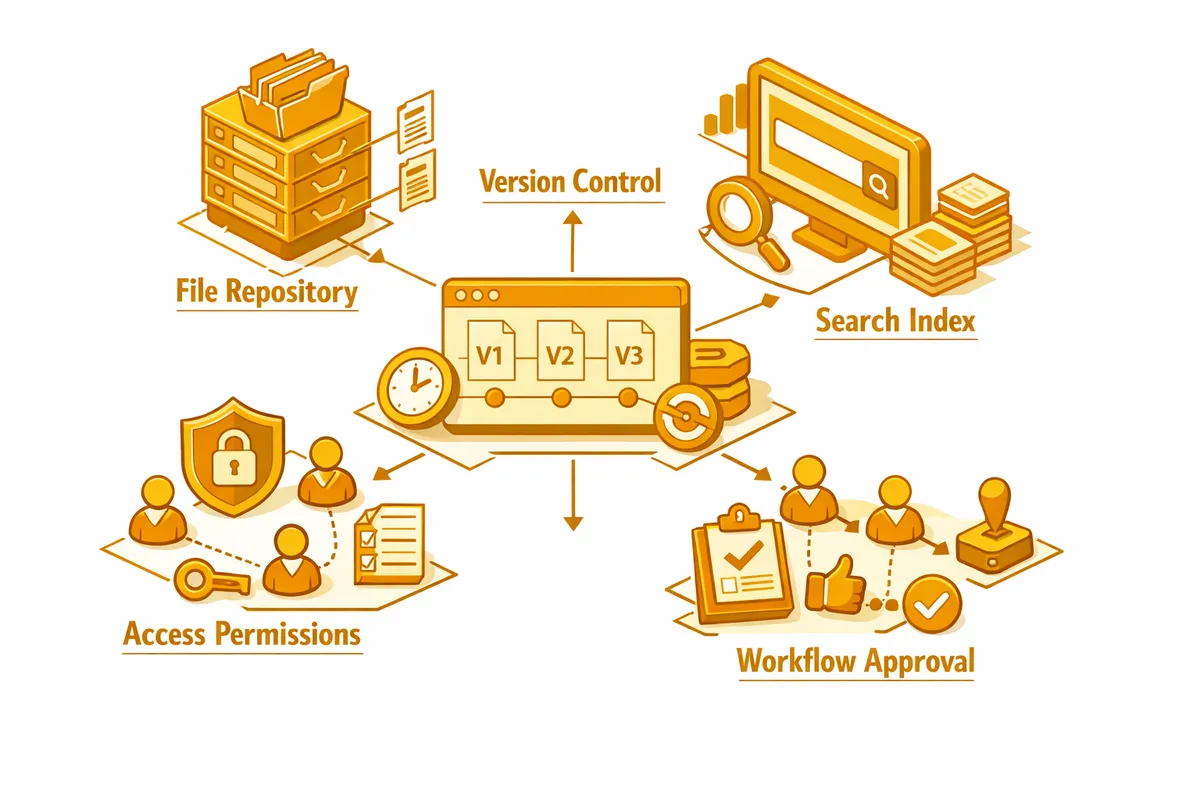
How We Build Document Management for Evanston
The first question in every document management engagement is taxonomy: how should your documents be organized, at what level of granularity, and what naming conventions will make retrieval reliable rather than dependent on memory? For a professional services firm on Sherman Avenue, the answer is usually a structure organized by client, then by matter or project, then by document type, with a naming convention that embeds date and version without relying on folder-level navigation.
We also assess your current document volume and growth rate. A wealth management firm managing 300 client households generates a different volume of documents than a three-person consulting firm. That assessment shapes whether we build on top of an existing document management platform, like SharePoint, NetDocuments, or Clio for legal firms, or whether a lighter-weight solution fits your scale. We do not prescribe platform before we understand scale and workflow.
The build phase configures the platform to your taxonomy and workflow requirements: folder structures that mirror your business organization, access permissions that restrict client files to the advisors and staff who work with that client, automated workflows that route new documents through approval or notification steps, and version control that preserves every prior version without manual archiving.
We also build the retrieval layer: search configurations that let you find any document by client name, date range, document type, or keyword within seconds. For professional services firms, the retrieval speed improvement alone is often the most immediately valuable outcome of the engagement.
Industries We Serve in Evanston
Wealth management and financial advisory practices near Ridge Avenue manage decades-long client relationships that generate substantial document archives: account agreements, financial plans, investment policy statements, tax documents, beneficiary designations, and annual review summaries. A document management system organizes these by household, enforces retention policies required by compliance, and provides an audit trail of every document accessed or modified.
Legal practices serving Evanston's residential and business community near the Evanston Public Library require matter-centric document organization with version control, conflict-check documentation, court filing records, and client correspondence. We configure legal document management platforms with the folder structures and access controls that standard legal practice management requires.
Accounting and tax practices on Davis Street and Chicago Avenue accumulate client tax returns, supporting documents, engagement letters, and correspondence across multiple tax years. A document management system organizes these by client and year, enforces multi-year retention schedules, and routes incoming client documents through a review and filing workflow rather than into a staff member's email inbox.
Tutoring and academic services businesses near Northwestern University generate student-level document archives including enrollment agreements, session notes, progress assessments, curriculum materials, and parent communications. A document management system organizes these by student and academic year, manages access so tutors see only their assigned students' records, and enables rapid retrieval when a parent requests their child's progress history.
Architecture and design practices operating in Evanston's professional community produce project documents across long engagement timelines: concept drawings, design development sets, permit applications, construction documents, and specification sheets. Version control is particularly critical in this context, as the distinction between a superseded drawing set and the current issued-for-construction set has real-world consequences.
Independent fitness studios and wellness businesses near Dawes Park with membership contracts, liability waivers, health history forms, and instructor certifications benefit from a document management system that organizes these by member and document type, enforces annual renewal workflows for expiring certifications, and maintains the liability documentation that their insurance policies require.
What to Expect Working With Us
1. Document inventory and taxonomy design. We audit your current document storage: how many files, what types, how they are currently organized, who needs access to what, and where the friction in retrieval and sharing currently lives. From that audit, we design a taxonomy that reflects how your business actually thinks about its documents, not how a generic template suggests you should.
2. Platform selection and configuration. We recommend a platform based on your document volume, workflow requirements, and existing software ecosystem. For legal firms, that often means a purpose-built legal document management system. For professional services firms with lighter requirements, SharePoint or Google Workspace with configured structure and permissions often fits well. We configure the platform to your taxonomy with your access controls and workflow rules before migrating any documents.
3. Migration and quality review. We migrate your existing documents to the new system with structure applied: every file placed in the correct folder hierarchy, naming conventions enforced, and version conflicts resolved. For large document archives at firms near Central Street, migration is staged by client or matter to allow parallel operation during the transition.
4. Training and adoption support. A document management system only works if the team uses it consistently. We run role-based training sessions, provide a written filing guide, and stay engaged for 30 days after launch to answer questions and correct filing habits before they calcify. The adoption phase is as important as the build phase.